Make the call.
One link, and it can only mean one thing. Offer a few times that genuinely work for you, they tap one, and it’s on both calendars before the back-and-forth would have started — and they never see the rest of your week.
Free for one person · no card · no account needed to book
Already on the line? Log in
What makes it different
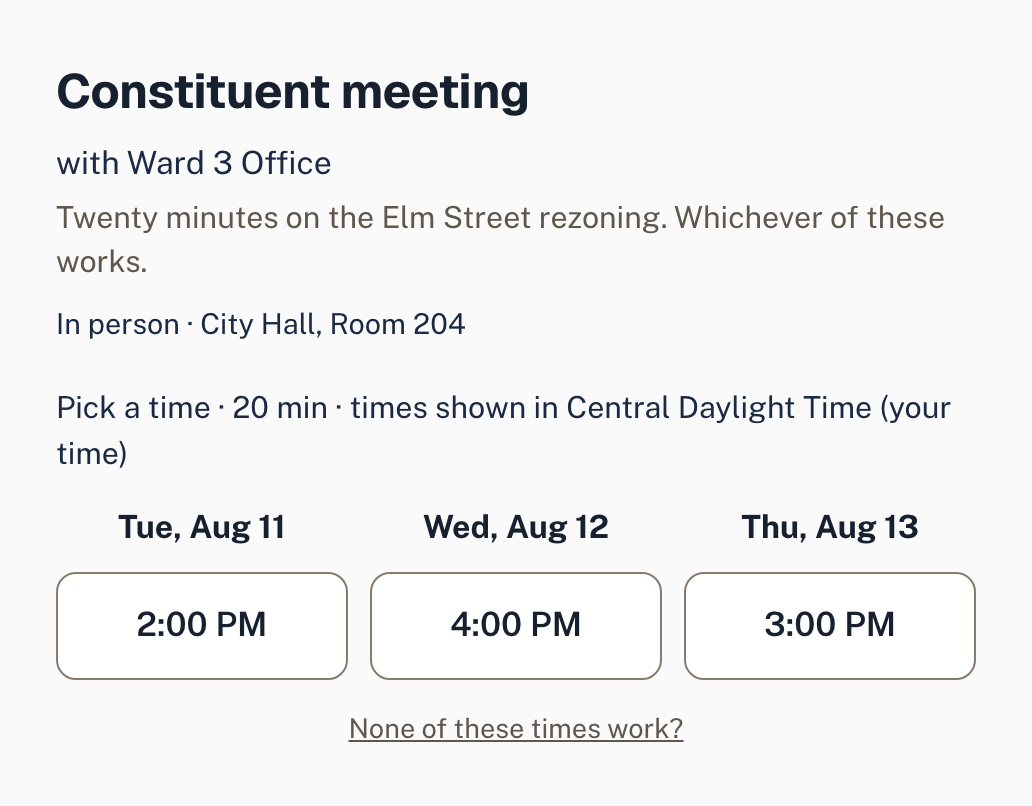
They don’t need your whole week.
Most scheduling tools answer “when are you free?” by publishing the answer — a grid of every opening you have, to anyone holding the link. Hotline asks a narrower question. You choose the handful of times you actually want this meeting to happen, and that is the entire universe the other person sees.
Your calendar stays yours. Nobody books over your afternoon because it was technically empty.
Your whole calendar
What they see
How it works
Three steps, one link.
Pick a few times
Choose 2–5 slots from your live calendar. Hotline checks them against everything you’ve connected.
Send one link
Paste it into an email, a text, a DM — or schedule it and let Hotline send it for you.
It’s booked
They tap once. It lands on both calendars, in both timezones, with the location attached.
What they get
In practice
Four fewer things to chase.
One call, no callback.
The back-and-forth is the part that costs a week. Offer the times once and it never starts.
Write it now. It goes at nine.
Compose the invite whenever you have the time, and let it arrive when they’ll actually read it.
Two people, one slot, no collision.
Every link is single-use and re-checked at the moment of booking, so a time can’t go twice.
You’ll know the moment they answer.
A proposal that’s still open says so. When it lands, it lands on both calendars at once.
What you get
It stopped being a booking link a while ago.
Proposing times is the wedge. What grew around it is the calendar you run the rest of your day from.
Getting booked
The part everyone else sells
- Hand-pick 2–5 times and share one link — no account for them, no calendar wall for you.
- Propose to several people at once and let the first workable time win.
- Write the invite now, send it later. Hotline places the call at the time you choose.
- Every link is single-use and re-checked at the moment of booking, so a slot can’t go twice.
- Set a video link or a street address per invite; it rides into the calendar event.
Running the day
The part that made it a calendar
- A real calendar — month and week views, click a slot to create, colour categories.
- Busy blocks from every calendar you connect, each labelled with where it came from.
- Focus sessions: estimate a task, put it on the calendar, time yourself, compare actual to estimate.
- A daily digest of what’s ahead and what’s waiting on you.
- Follow-ups captured while the meeting is still fresh, queued for the next call.
Wherever you are
The part that follows you out the door
- Connect Google, Apple, or any calendar that publishes an ICS feed.
- Read-only where it has to be — Proton events show as busy blocks and nothing more.
- Reminders that land on your phone, not just in your inbox.
- Times shown in the recipient’s timezone, so nobody does the arithmetic.
For organizations
And when the calendar isn’t only yours.
Campaigns, mutual aid, small nonprofits — the same product runs the rota. Shifts, coverage, hours and cost, without a second tool and without asking volunteers to sign up for anything.
Build it as a draft.
Fill the week in and watch the day nobody covers stay empty until it doesn’t. Nothing reaches a calendar until you publish.
Publish, and it’s on their phones.
Not one photo everybody squints at — each person gets their own week, and you can see it was delivered.
Answered Tuesday, not Saturday.
Someone declines while there’s still week left to fix it in, and the shift is covered again before it matters.
Find yourself
What kind of calendar are you running?
The line’s open
Make the first call
Free for one person — the whole product, nothing metered, no card. If you’re a civic or public-interest team, we’ll set the first calendars up with you.
Already have an account? Log in
And yes — it’s on your cell phone too.
Coming to the App Store and Google Play.